Align Images from Different Slices Using SIFT
March 2026
Matthew Bieniosek, Siyu He
Overview
This tutorial demonstrates how to align two histology images from different spatial omics slices using feature-based image registration. The pipeline handles images with unknown relative translation, rotation, and/or scaling.
Method
The alignment uses BRISK keypoint detection with VGG descriptors, followed by brute-force matching and RANSAC-based transformation estimation. This is a robust approach for aligning tissue images that may differ in staining, resolution, or orientation.
Pipeline
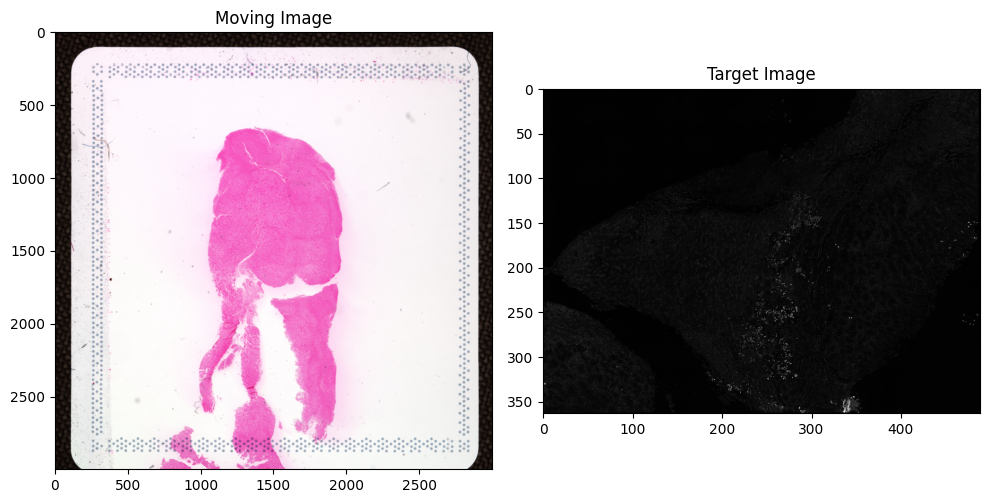
Load and downscale images for faster processing
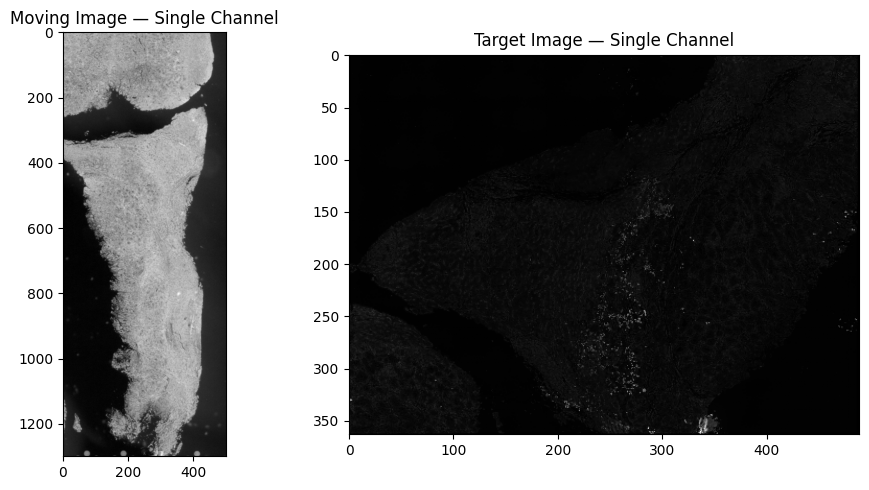
Convert to single-channel (grayscale or hematoxylin deconvolution)
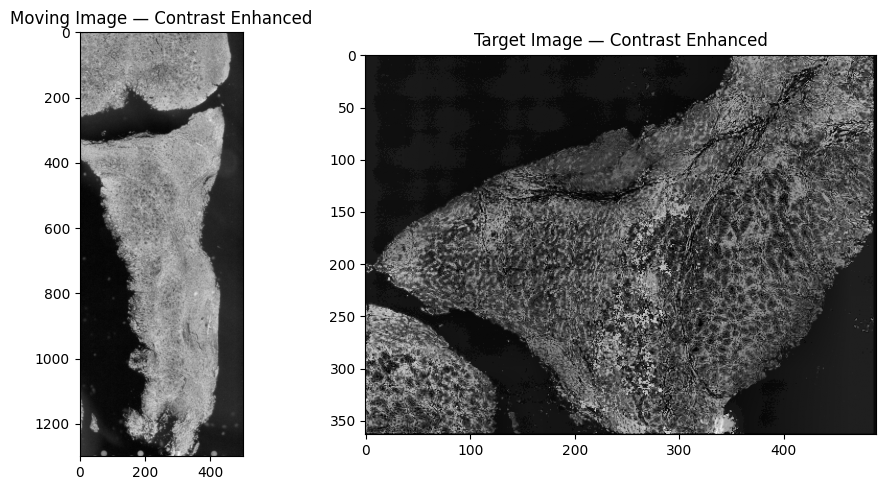
Enhance contrast using CLAHE
Detect keypoints and compute transformation matrix
Apply transformation and verify alignment
(Optional) Scale back to full resolution
(Optional) Transform Visium spot coordinates
Prerequisites
Dependencies:
pip install opencv-contrib-python numpy matplotlib scikit-image imageio tifffile imagecodecs pandas scipy
Note:
opencv-contrib-python(not justopencv-python) is required for thecv2.xfeatures2d.VGG_createdescriptor.imagecodecsis required for reading compressed TIFF files (e.g., LZW compression).
Step 1: Setup
[1]:
%matplotlib inline
import cv2
import numpy as np
import matplotlib.pyplot as plt
import imageio.v2 as io
import tifffile
import imagecodecs  # Required for reading LZW-compressed TIFFs
import pandas as pd
from skimage.color import rgb2hed, rgb2gray
from skimage.measure import block_reduce
from scipy.spatial import distance
from statistics import mean
[2]:
# --- Utility Functions ---

def convert_im_to_8bit(im, percentile_thresh=100, min_correct=False):
    """Convert an image to 8-bit.

    Parameters
    ----------
    im : np.ndarray
        Input image of any bit depth.
    percentile_thresh : int
        Percentile of max value to use as the output max (default: 100).
    min_correct : bool
        If True, sets the minimum non-zero value to zero.

    Returns
    -------
    np.ndarray
        Image converted to uint8.
    """
    max_val_8bit = np.iinfo(np.uint8).max
    max_val = np.percentile(im, percentile_thresh)
    min_val = 0

    if min_correct:
        min_val = np.min(im[np.nonzero(im)])

    im = im.copy()
    im[im > max_val] = max_val
    im[im < min_val] = min_val

    return np.array(((im - min_val) / max_val) * max_val_8bit, dtype='uint8')


def filter_features(kp, desc, n_keep):
    """Keep the keypoints with the highest response.

    Parameters
    ----------
    kp : list
        List of cv2.KeyPoint objects.
    desc : np.ndarray
        2D array of keypoint descriptors (rows = keypoints, cols = features).
    n_keep : int
        Maximum number of keypoints to retain.

    Returns
    -------
    tuple
        Filtered (keypoints, descriptors).
    """
    response = np.array([x.response for x in kp])
    keep_idx = np.argsort(response)[::-1][:n_keep]
    return [kp[i] for i in keep_idx], desc[keep_idx, :]


def convert_to_single_channel(image, algorithm='grayscale'):
    """Convert an RGB image to single channel.

    Parameters
    ----------
    image : np.ndarray
        Input image (RGB or grayscale).
    algorithm : str
        Conversion method: 'grayscale', 'deconvolved_hematoxylin',
        'rgb_ch0', 'rgb_ch1', or 'rgb_ch2'.

    Returns
    -------
    np.ndarray
        Single-channel uint8 image.
    """
    if len(image.shape) == 3:
        if algorithm == 'deconvolved_hematoxylin':
            return convert_im_to_8bit(rgb2hed(image)[:, :, 0])
        elif algorithm in ('rgb_ch0', 'rgb_ch1', 'rgb_ch2'):
            ch = int(algorithm[-1])
            return 255 - convert_im_to_8bit(image[:, :, ch])
        else:  # grayscale
            return 255 - convert_im_to_8bit(rgb2gray(image))
    else:
        return np.array(image)


def block_reduce_image(image, scale_factor):
    """Downscale an image by averaging blocks.

    Parameters
    ----------
    image : np.ndarray
        Input image.
    scale_factor : int
        Block size for downscaling.

    Returns
    -------
    np.ndarray
        Downscaled image.
    """
    if len(image.shape) == 3:
        return block_reduce(image, block_size=(scale_factor, scale_factor, 1), func=np.mean)
    else:
        return block_reduce(image, block_size=(scale_factor, scale_factor), func=np.mean)


def check_alignment_pass(inliers, transform_mat, dst_inliers, src_inliers):
    """Check whether the alignment looks valid.

    Parameters
    ----------
    inliers : np.ndarray
        Boolean array indicating which keypoints are inliers.
    transform_mat : np.ndarray
        Transformation matrix.
    dst_inliers : np.ndarray
        Target image inlier keypoints.
    src_inliers : np.ndarray
        Moving image inlier keypoints.

    Returns
    -------
    bool
        True if alignment passes all checks.
    """
    pass_alignment = True

    if np.sum(inliers) < 7:
        print('WARNING: Few matching keypoints — potential bad fit')
        pass_alignment = False

    if (abs(transform_mat[0, 0]) < 0.001 and abs(transform_mat[1, 0]) < 0.001 and
            abs(transform_mat[0, 1]) < 0.001 and abs(transform_mat[1, 1]) < 0.001):
        print('WARNING: Potential trivial solution — transformation matrix close to 0')
        pass_alignment = False

    if ((np.max(dst_inliers[:, 1]) - np.min(dst_inliers[:, 1])) < 50 and
            (np.max(dst_inliers[:, 0]) - np.min(dst_inliers[:, 0])) < 50):
        print('WARNING: Potential trivial solution — destination points all similar')
        pass_alignment = False

    if ((np.max(src_inliers[:, 1]) - np.min(src_inliers[:, 1])) < 10 and
            (np.max(src_inliers[:, 0]) - np.min(src_inliers[:, 0])) < 10):
        print('WARNING: Potential trivial solution — source points all similar')
        pass_alignment = False

    return pass_alignment


def get_alignment_transform(im_moving, im_target,
                            verbose=True, max_num_keypoints=2**18,
                            ratio_threshold=0.85, ransac_reproj_threshold=20,
                            min_feature_size=5,
                            find_transform_func=cv2.estimateAffinePartial2D,
                            kp_detector=None, kp_descriptor=None,
                            im_moving_offset=(0, 0), im_target_offset=(0, 0)):
    """Find the transformation matrix between two images using feature matching.

    Uses BRISK keypoint detection + VGG descriptors by default, with brute-force
    matching and RANSAC-based transformation estimation.

    Parameters
    ----------
    im_moving : np.ndarray
        Moving image (will be transformed).
    im_target : np.ndarray
        Target image (reference).
    verbose : bool
        If True, display keypoint matches.
    max_num_keypoints : int
        Maximum number of keypoints to use.
    ratio_threshold : float
        Lowe's ratio test threshold (higher = less strict matching).
    ransac_reproj_threshold : float
        RANSAC reprojection threshold (higher = more tolerant of distortion).
    min_feature_size : float
        Minimum keypoint size to retain.
    find_transform_func : callable
        OpenCV function for estimating the transform (e.g., cv2.estimateAffinePartial2D).
    kp_detector : cv2.Feature2D or None
        Keypoint detector. Defaults to BRISK.
    kp_descriptor : cv2.Feature2D or None
        Keypoint descriptor. Defaults to VGG.
    im_moving_offset : tuple
        (x, y) offset for moving image keypoints (for ROI correction).
    im_target_offset : tuple
        (x, y) offset for target image keypoints.

    Returns
    -------
    H : np.ndarray or list
        Transformation matrix. Empty list if alignment fails.
    pass_alignment : bool
        Whether the alignment passed quality checks.
    stats : dict
        Alignment statistics.
    """
    if kp_detector is None:
        kp_detector = cv2.BRISK_create()
    if kp_descriptor is None:
        kp_descriptor = cv2.xfeatures2d.VGG_create(scale_factor=5.0)

    stats = {}

    # Detect keypoints
    detected_kp = kp_detector.detect(im_moving)
    kp1, des1 = kp_descriptor.compute(im_moving, detected_kp)
    print(f'Keypoints detected in moving image: {len(kp1)}')
    stats['keypoints_moving'] = len(kp1)

    detected_kp = kp_detector.detect(im_target)
    kp2, des2 = kp_descriptor.compute(im_target, detected_kp)
    print(f'Keypoints detected in target image: {len(kp2)}')
    stats['keypoints_target'] = len(kp2)

    # Filter by minimum feature size
    sizes1 = np.array([kp.size for kp in kp1])
    mask1 = sizes1 > min_feature_size
    kp1 = np.array(kp1)[mask1]
    des1 = des1[mask1]

    sizes2 = np.array([kp.size for kp in kp2])
    mask2 = sizes2 > min_feature_size
    kp2 = np.array(kp2)[mask2]
    des2 = des2[mask2]

    # Keep top keypoints by response
    kp1, des1 = filter_features(kp1, des1, max_num_keypoints)
    kp2, des2 = filter_features(kp2, des2, max_num_keypoints)

    # Match descriptors
    bf = cv2.BFMatcher()
    matches = bf.knnMatch(des1, des2, k=2)

    # Lowe's ratio test
    good = [m for m in matches if m[0].distance < ratio_threshold * m[1].distance]
    matches = np.asarray(good)
    print(f'Keypoint matches after ratio test: {matches.shape[0]}')
    stats['matches'] = matches.shape[0]

    # Compute transformation using RANSAC
    if len(matches[:, 0]) < 4:
        print('WARNING: Not enough keypoints to perform alignment')
        return [], False, stats

    src = np.float32([kp1[m.queryIdx].pt for m in matches[:, 0]]).reshape(-1, 1, 2)
    dst = np.float32([kp2[m.trainIdx].pt for m in matches[:, 0]]).reshape(-1, 1, 2)

    for ind in range(src.shape[0]):
        src[ind, :, :] += im_moving_offset
        dst[ind, :, :] += im_target_offset

    H, inliers = find_transform_func(src, dst, method=cv2.RANSAC,
                                     ransacReprojThreshold=ransac_reproj_threshold)
    print(f'Inliers used for alignment: {np.sum(inliers)}')
    stats['inliers'] = int(np.sum(inliers))
    stats['transformation_matrix'] = H

    src_inliers = src[inliers == 1]
    dst_inliers = dst[inliers == 1]

    pass_alignment = check_alignment_pass(inliers, H, dst_inliers, src_inliers)
    stats['pass_alignment'] = pass_alignment

    # Plot keypoint matches
    if verbose:
        f, axarr = plt.subplots(1, 2, figsize=(12, 5))
        axarr[0].set_title('Moving Image — Inlier Keypoints')
        axarr[0].imshow(im_moving, cmap='gray')
        axarr[0].scatter(x=src_inliers[:, 0], y=src_inliers[:, 1], c='r', s=40)
        axarr[1].set_title('Target Image — Inlier Keypoints')
        axarr[1].imshow(im_target, cmap='gray')
        axarr[1].scatter(x=dst_inliers[:, 0], y=dst_inliers[:, 1], c='r', s=40)
        plt.tight_layout()
        plt.show()

    return H, pass_alignment, stats


def scale_transformation_matrix(transform_matrix, scale_moving, scale_target):
    """Scale a 2x3 transformation matrix to account for image downscaling.

    Parameters
    ----------
    transform_matrix : np.ndarray
        2x3 affine transformation matrix.
    scale_moving : float
        Scale factor applied to the moving image.
    scale_target : float
        Scale factor applied to the target image.

    Returns
    -------
    np.ndarray
        Scaled 2x3 transformation matrix for full-resolution images.
    """
    mat_3x3 = np.vstack([transform_matrix, np.array([0, 0, 1])])
    scale_moving_mat = np.array([[1 / scale_moving, 0, 0],
                                 [0, 1 / scale_moving, 0],
                                 [0, 0, 1]])
    scale_target_mat = np.array([[scale_target, 0, 0],
                                 [0, scale_target, 0],
                                 [0, 0, scale_target]])
    scaled = np.matmul(mat_3x3, scale_target_mat)
    scaled = np.matmul(scaled, scale_moving_mat)
    return scaled[:2, :]
Step 2: User Inputs
Configure the paths and parameters for your alignment. Update the file paths below to point to your images.
Download the example dataset from Figshare (doi: 10.6084/m9.figshare.30676556). The download is skipped automatically if the files already exist.
[3]:
import urllib.request
import os

data_dir = "Align_modality_example_data"
os.makedirs(data_dir, exist_ok=True)

files = {
    "CODEX_data.tif": "https://ndownloader.figshare.com/files/62503219",              # Target image (~411 MB)
    "cytassist_image.tiff": "https://ndownloader.figshare.com/files/62503225",         # Moving image (~17 MB)
    "tissue_positions_list.csv": "https://ndownloader.figshare.com/files/62503207",    # Visium spot coordinates
}

for filename, url in files.items():
    filepath = os.path.join(data_dir, filename)
    if os.path.exists(filepath):
        print(f"Already exists: {filepath}")
    else:
        print(f"Downloading {filename}...")
        urllib.request.urlretrieve(url, filepath)
        print(f"  Saved to {filepath}")
Already exists: Align_modality_example_data/CODEX_data.tif
Already exists: Align_modality_example_data/cytassist_image.tiff
Already exists: Align_modality_example_data/tissue_positions_list.csv
[4]:
# --- File Paths ---
im_target_path = 'Align_modality_example_data/CODEX_data.tif'        # Target (reference) image
im_moving_path = 'Align_modality_example_data/cytassist_image.tiff'  # Moving image (to be aligned)

# (Optional) Visium spot coordinate files
input_visium_coords_path = 'Align_modality_example_data/tissue_positions_list.csv'
output_visium_coords_path = 'Align_modality_example_data/transformed_tissue_positions_list.csv'

# --- Image Parameters ---
scale_factor_target = 15   # Downscale factor for target image
scale_factor_moving = 1    # Downscale factor for moving image
flip_moving_image = True   # Set True if images are mirrored

# --- Transform Type ---
find_transform_func = cv2.estimateAffinePartial2D  # or cv2.findHomography
Step 3: Load and Preprocess Images
Load the target and moving images, apply optional mirroring, and downscale for faster keypoint detection. The downscaled images are used for alignment; the full-resolution images are transformed later.
[5]:
# Load images
im_target_full_res = tifffile.imread(im_target_path)
im_target_full_res = np.sum(im_target_full_res, axis=0)  # Sum across channels for multi-channel TIFFs

im_moving_full_res = io.imread(im_moving_path)

# Fix channel-first layout if needed
if im_target_full_res.shape[0] == 3:
    im_target_full_res = np.moveaxis(im_target_full_res, 0, -1)
if im_moving_full_res.shape[0] == 3:
    im_moving_full_res = np.moveaxis(im_moving_full_res, 0, -1)

# Flip moving image if mirrored
if flip_moving_image:
    im_moving_full_res = cv2.flip(im_moving_full_res, 1)

# Downscale
im_target = block_reduce_image(im_target_full_res, scale_factor_target)
im_moving = block_reduce_image(im_moving_full_res, scale_factor_moving)

# Convert to 8-bit
im_target = convert_im_to_8bit(im_target)
im_moving = convert_im_to_8bit(im_moving)
im_target_full_res = convert_im_to_8bit(im_target_full_res)
im_moving_full_res = convert_im_to_8bit(im_moving_full_res)

print(f'Moving image shape: {im_moving.shape}')
print(f'Target image shape: {im_target.shape}')
Moving image shape: (3000, 3000, 3)
Target image shape: (363, 489)
[6]:
f, axarr = plt.subplots(1, 2, figsize=(10, 5))
axarr[0].set_title('Moving Image')
axarr[0].imshow(im_moving, cmap='gray')
axarr[1].set_title('Target Image')
axarr[1].imshow(im_target, cmap='gray')
plt.tight_layout()
plt.show()
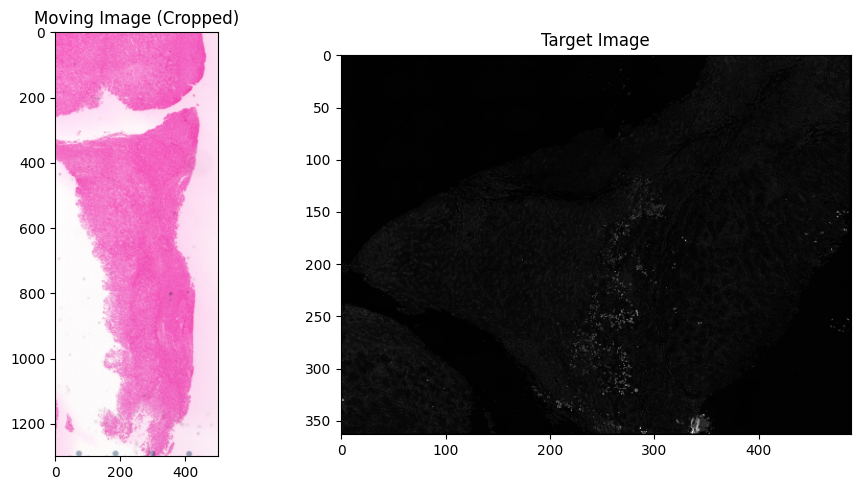
Step 4: (Optional) Select Region of Interest but highly recommend
If the moving image contains a large background area, cropping to the tissue region improves alignment. Set the ROI coordinates below, or set use_roi = False to skip.
[7]:
use_roi = True

# ROI coordinates (y_min, y_max, x_min, x_max) — adjust based on your image
roi_y_min, roi_y_max = 1500, 2800
roi_x_min, roi_x_max = 1500, 2000

if use_roi:
    im_moving = im_moving[roi_y_min:roi_y_max, roi_x_min:roi_x_max]
    print(f'Cropped moving image shape: {im_moving.shape}')

    f, axarr = plt.subplots(1, 2, figsize=(10, 5))
    axarr[0].set_title('Moving Image (Cropped)')
    axarr[0].imshow(im_moving, cmap='gray')
    axarr[1].set_title('Target Image')
    axarr[1].imshow(im_target, cmap='gray')
    plt.tight_layout()
    plt.show()
Cropped moving image shape: (1300, 500, 3)
Step 5: Convert to Single Channel
Convert each image to a single-channel representation for feature detection. Both images should have similar appearance after conversion (both dark-on-light or both light-on-dark).
Options: 'grayscale', 'deconvolved_hematoxylin' (for H&E), 'rgb_ch0', 'rgb_ch1', 'rgb_ch2'
[8]:
single_channel_algorithm_moving = 'grayscale'
single_channel_algorithm_target = 'grayscale'

im_moving_sc = convert_to_single_channel(im_moving, single_channel_algorithm_moving)
im_target_sc = convert_to_single_channel(im_target, single_channel_algorithm_target)

f, axarr = plt.subplots(1, 2, figsize=(10, 5))
axarr[0].set_title('Moving Image — Single Channel')
axarr[0].imshow(im_moving_sc, cmap='gray')
axarr[1].set_title('Target Image — Single Channel')
axarr[1].imshow(im_target_sc, cmap='gray')
plt.tight_layout()
plt.show()
Step 6: Contrast Enhancement
Apply Contrast Limited Adaptive Histogram Equalization (CLAHE) to improve feature detection. Increase clip_limit for brighter images; decrease if images appear washed out.
Goal: Both images should look similar in intensity and contrast after enhancement.
[9]:
clahe_clip_limit_moving = 1    # Increase for brighter output
clahe_clip_limit_target = 10   # Increase for brighter output

clahe_moving = cv2.createCLAHE(clipLimit=clahe_clip_limit_moving)
clahe_target = cv2.createCLAHE(clipLimit=clahe_clip_limit_target)

im_moving_contrast = convert_im_to_8bit(clahe_moving.apply(im_moving_sc))
im_target_contrast = convert_im_to_8bit(clahe_target.apply(im_target_sc))
im_target_full_res_contrast = convert_im_to_8bit(clahe_target.apply(im_target_full_res))

f, axarr = plt.subplots(1, 2, figsize=(10, 5))
axarr[0].set_title('Moving Image — Contrast Enhanced')
axarr[0].imshow(im_moving_contrast, cmap='gray')
axarr[1].set_title('Target Image — Contrast Enhanced')
axarr[1].imshow(im_target_contrast, cmap='gray')
plt.tight_layout()
plt.show()
Step 7: Feature Detection and Alignment
Detect BRISK keypoints, compute VGG descriptors, match features between images, and estimate the transformation matrix using RANSAC.
Key parameters:
ratio_threshold: Lowe’s ratio test threshold (0.0–1.0). Higher values accept more matches but may include false positives. Increase if images differ significantly in staining.ransac_reproj_threshold: RANSAC reprojection tolerance. Higher values tolerate more tissue distortion between slices.min_feature_size: Minimum keypoint size to retain. Increase to ignore small/noisy features.max_num_keypoints: Cap on the number of keypoints (to avoid memory issues with very large images).
[10]:
ratio_threshold = 0.9
ransac_reproj_threshold = 30
min_feature_size = 1
max_num_keypoints = 20000

transformation_matrix, pass_alignment, alignment_stats = get_alignment_transform(
    im_moving_contrast, im_target_contrast,
    max_num_keypoints=max_num_keypoints,
    ratio_threshold=ratio_threshold,
    ransac_reproj_threshold=ransac_reproj_threshold,
    min_feature_size=min_feature_size,
    find_transform_func=find_transform_func)

if pass_alignment:
    print(f'\nTransformation matrix:\n{transformation_matrix}')
else:
    print('\nAlignment failed. Try adjusting the single-channel conversion or contrast enhancement parameters.')
Keypoints detected in moving image: 8644
Keypoints detected in target image: 7519
Keypoint matches after ratio test: 100
Inliers used for alignment: 14
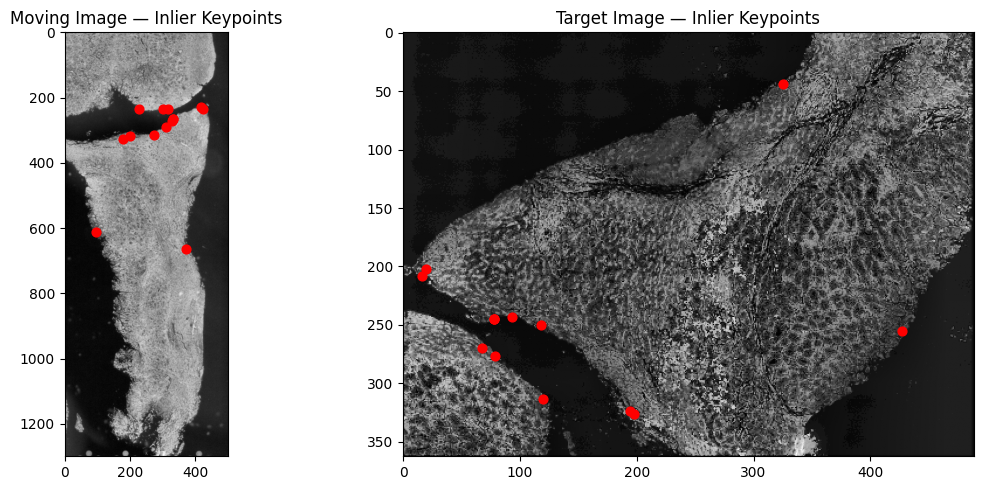
Transformation matrix:
[[-4.51669933e-01  6.72495095e-01  5.19236155e+01]
 [-6.72495095e-01 -4.51669933e-01  5.88669889e+02]]
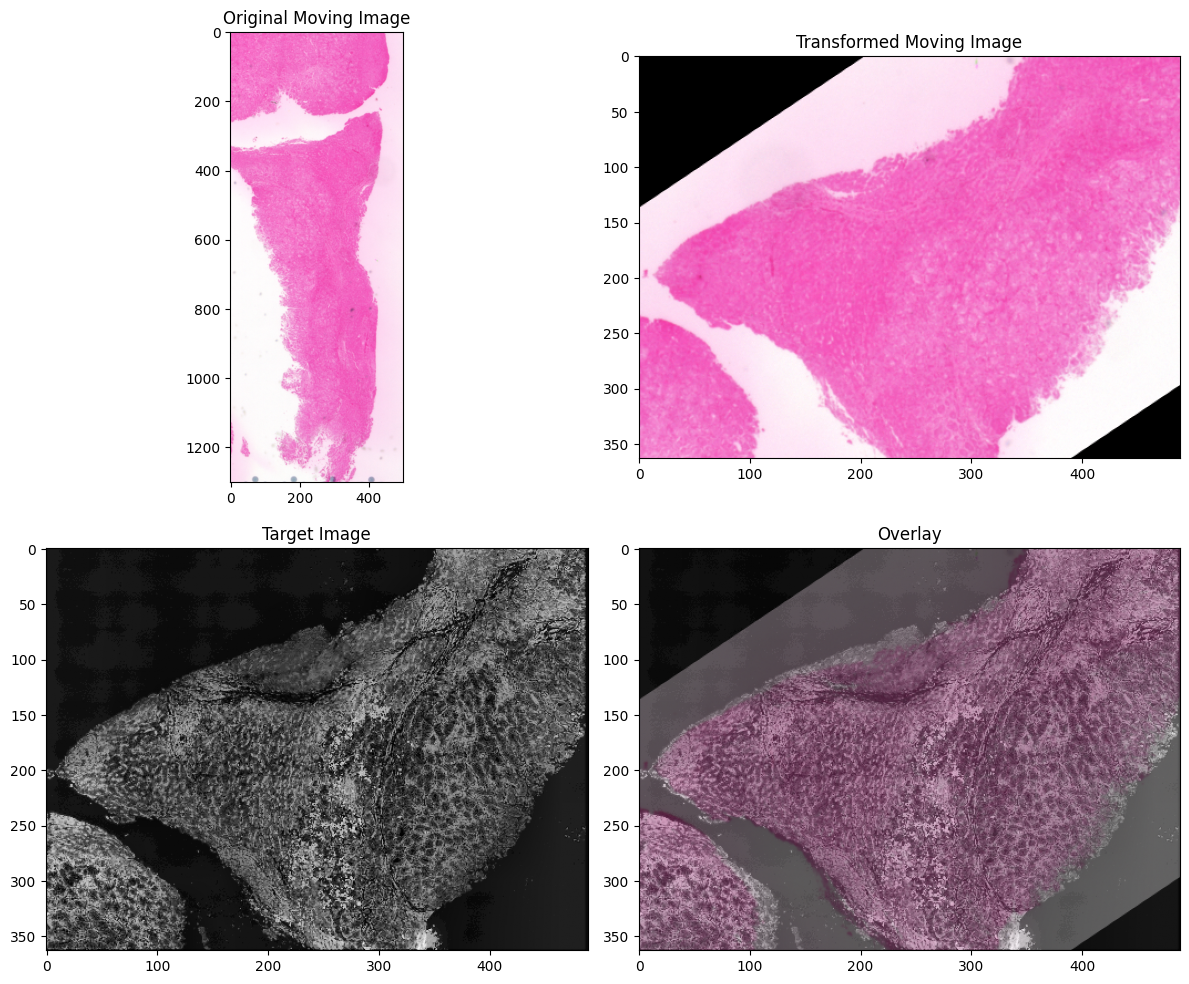
Step 8: Display Aligned Images
Apply the transformation to the moving image and overlay with the target to verify alignment quality.
[11]:
if pass_alignment:
    if find_transform_func == cv2.findHomography:
        im_moving_aligned = cv2.warpPerspective(
            im_moving, transformation_matrix,
            (im_target.shape[1], im_target.shape[0]))
    else:
        im_moving_aligned = cv2.warpAffine(
            im_moving, transformation_matrix,
            (im_target.shape[1], im_target.shape[0]))

    f, axarr = plt.subplots(2, 2, figsize=(12, 10))
    axarr[0, 0].set_title('Original Moving Image')
    axarr[0, 0].imshow(im_moving, cmap='gray')
    axarr[0, 1].set_title('Transformed Moving Image')
    axarr[0, 1].imshow(im_moving_aligned, cmap='gray')
    axarr[1, 0].set_title('Target Image')
    axarr[1, 0].imshow(im_target_contrast, cmap='gray')
    axarr[1, 1].set_title('Overlay')
    axarr[1, 1].imshow(im_moving_aligned, cmap='gray')
    axarr[1, 1].imshow(im_target_contrast, alpha=0.7, cmap='gray')
    f.tight_layout()
    plt.show()
else:
    print('Alignment failed. See Step 7 output for details.')
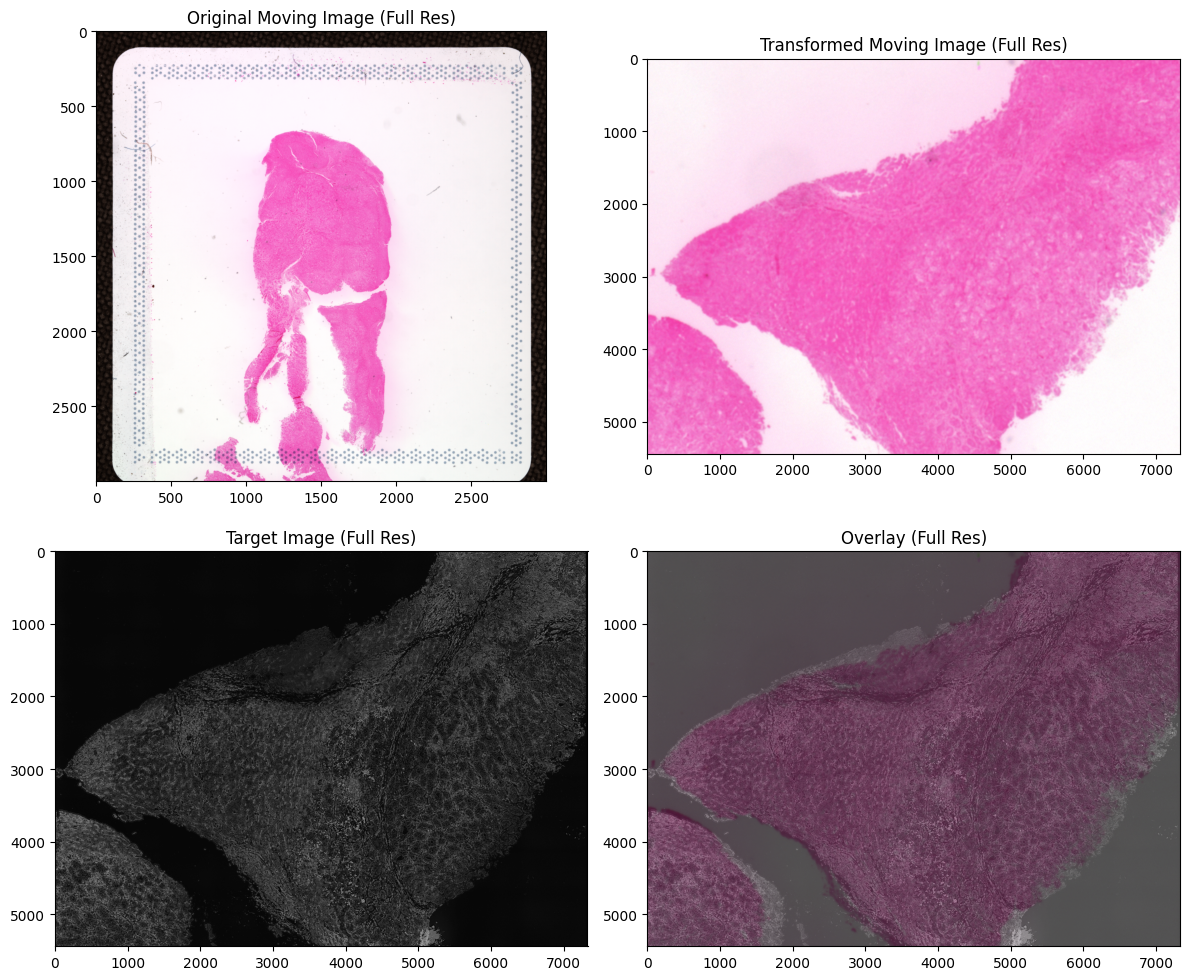
Step 9: Full-Resolution Alignment
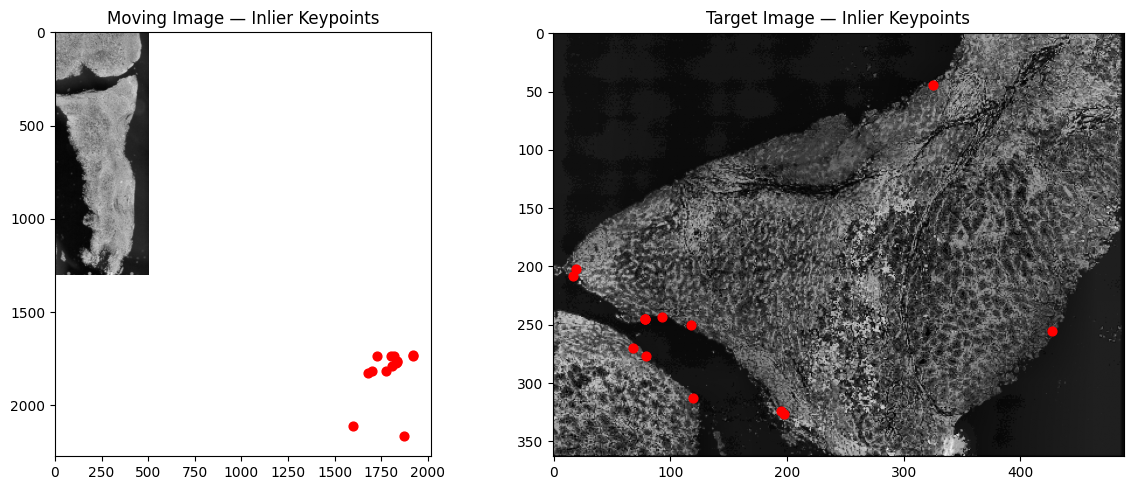
Re-run feature detection with ROI offset correction, then scale the transformation matrix back to full-resolution coordinates. This produces the final aligned image at the original resolution.
[12]:
# Re-compute transform with ROI offset
moving_offset = [0, 0]
if use_roi:
    moving_offset = [roi_x_min, roi_y_min]

transformation_matrix_scaled, pass_alignment, _ = get_alignment_transform(
    im_moving_contrast, im_target_contrast,
    max_num_keypoints=max_num_keypoints,
    ratio_threshold=ratio_threshold,
    ransac_reproj_threshold=ransac_reproj_threshold,
    min_feature_size=min_feature_size,
    find_transform_func=find_transform_func,
    im_moving_offset=moving_offset)

# Scale to full resolution
transformation_matrix_full_res = scale_transformation_matrix(
    transformation_matrix_scaled, scale_factor_moving, scale_factor_target)

# Apply to full-resolution moving image
im_moving_aligned_full_res = cv2.warpAffine(
    im_moving_full_res, transformation_matrix_full_res,
    (im_target_full_res.shape[1], im_target_full_res.shape[0]))

# Display
f, axarr = plt.subplots(2, 2, figsize=(12, 10))
axarr[0, 0].set_title('Original Moving Image (Full Res)')
axarr[0, 0].imshow(im_moving_full_res, cmap='gray')
axarr[0, 1].set_title('Transformed Moving Image (Full Res)')
axarr[0, 1].imshow(im_moving_aligned_full_res, cmap='gray')
axarr[1, 0].set_title('Target Image (Full Res)')
axarr[1, 0].imshow(im_target_full_res_contrast, cmap='gray')
axarr[1, 1].set_title('Overlay (Full Res)')
axarr[1, 1].imshow(im_moving_aligned_full_res, cmap='gray')
axarr[1, 1].imshow(im_target_full_res_contrast, alpha=0.7, cmap='gray')
f.tight_layout()
plt.show()
Keypoints detected in moving image: 8644
Keypoints detected in target image: 7519
Keypoint matches after ratio test: 100
Inliers used for alignment: 14
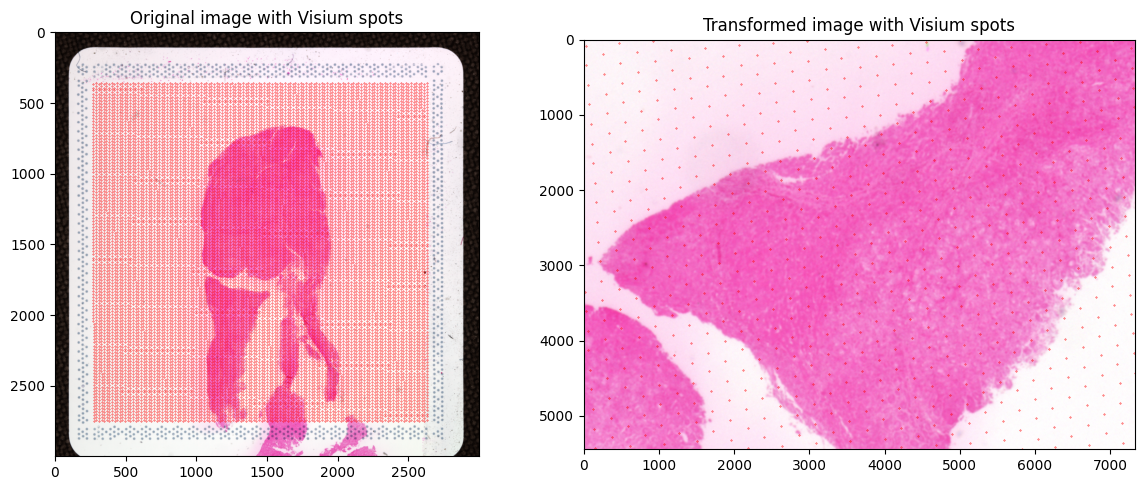
Step 10: Transform Visium Spot Coordinates
If aligning Visium spatial transcriptomics data, apply the same transformation to the spot coordinates so they match the target image coordinate system.
[13]:
tissue_to_image_scale = 1

df = pd.read_csv(input_visium_coords_path)
df['transformed_coords_x'] = 0
df['transformed_coords_y'] = 0

for index, row in df.iterrows():
    pt = np.array([
        row['pxl_col_in_fullres'] * tissue_to_image_scale,
        row['pxl_row_in_fullres'] * tissue_to_image_scale,
        1.0
    ])

    if flip_moving_image:
        pt[0] = im_moving_full_res.shape[0] - pt[0]

    transformed = np.matmul(transformation_matrix_full_res, pt)
    df.loc[index, 'transformed_coords_x'] = int(transformed[0])
    df.loc[index, 'transformed_coords_y'] = int(transformed[1])

print(f'Transformed {len(df)} spot coordinates.')
Transformed 14336 spot coordinates.
[14]:
# Verify: overlay all spots on original and transformed images
f, axarr = plt.subplots(1, 2, figsize=(12, 5))

axarr[0].imshow(io.imread(im_moving_path), cmap='gray')
axarr[0].scatter(
    x=df['pxl_col_in_fullres'] * tissue_to_image_scale,
    y=df['pxl_row_in_fullres'] * tissue_to_image_scale,
    c='r', s=0.1)
axarr[0].set_title('Original image with Visium spots')

axarr[1].imshow(im_moving_aligned_full_res, cmap='gray')
axarr[1].scatter(
    x=df['transformed_coords_x'],
    y=df['transformed_coords_y'],
    c='r', s=0.1)
axarr[1].set_xlim(0, im_moving_aligned_full_res.shape[1])
axarr[1].set_ylim(im_moving_aligned_full_res.shape[0], 0)
axarr[1].set_title('Transformed image with Visium spots')

plt.tight_layout()
plt.show()
[15]:
df.to_csv(output_visium_coords_path, index=False)
print(f'Saved transformed coordinates to {output_visium_coords_path}')
Saved transformed coordinates to Align_modality_example_data/transformed_tissue_positions_list.csv